 Clayground
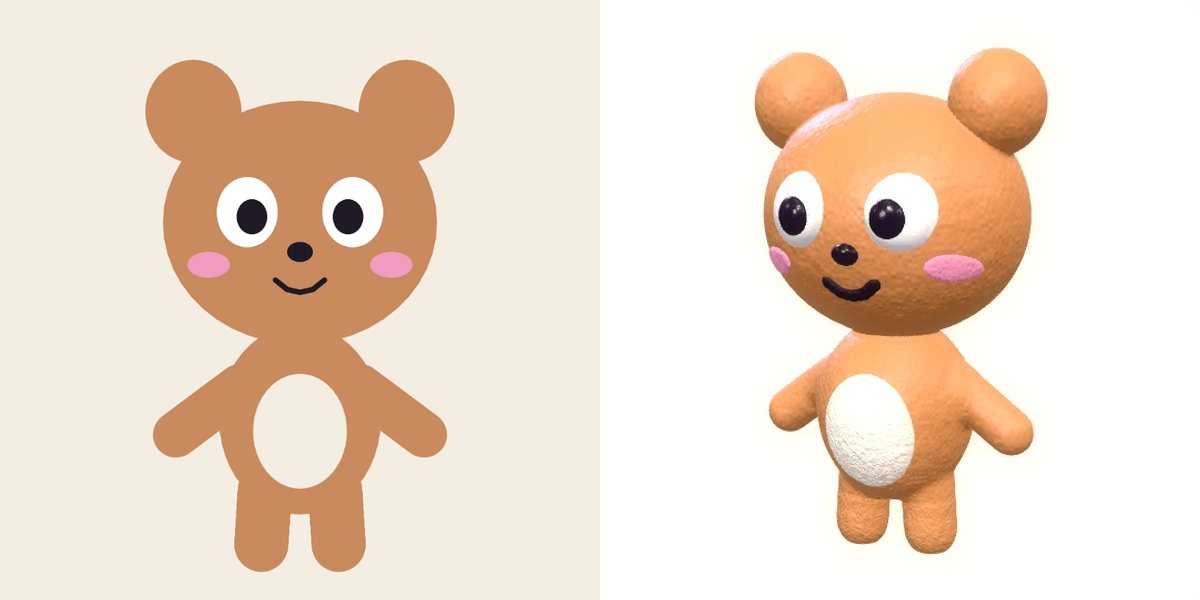
Clayground’s Draw page turns a flat drawing into a 3D model in your browser. You draw a character, or add a picture, and press Make it 3D. It sculpts a clay toy with a separate layer for each part, such as the head, body, arms, legs and eyes. It is free, needs no account and uses no AI.
Make one in five steps
- Open clayvr.com/draw. Use a finger on a phone or tablet, or a mouse or pen on a computer.
- Draw your character in flat colors: the head and body first, then arms and legs, then the face. Ink, Monoline and Blob are the brushes, the color disc changes the color, and Mirror keeps both sides matching.
- No idea yet? Tap the dice for a sample, pick one of the four starters, or press Add a picture to bring in a drawing or a photo.
- Press Make it 3D. A simple drawing takes a few seconds; a photo or a busy picture takes longer, most of all on a phone. The toy opens in the browser studio with one layer for each part.
- Turn it, paint it, then export a GLB or OBJ, or Print (STL) for a 60 mm file.
What it does with your drawing
Clayground reads the shapes you drew and decides what each one is from where it sits. Nothing is guessed from other pictures.
| You draw | You get |
|---|---|
| A solid shape, such as a head or a body | A rounded lump of clay, not a flat cutout |
| A thin shape leaving the body | An arm, a leg or a tail, joined to the body |
| A shape on top of another, such as an eye or a belly patch | A feature sitting on the skin underneath |
| A thin line, such as a mouth or a brow | A line laid into the clay |
| Two matching shapes either side of the middle | A pair, such as ears or feet, placed together |
| Feet at the bottom | Flat soles, so the toy stands on the ground |
Drawings that come out best
- One color for each part. Every area of one color is read as a part, so a flat color works better than shading.
- Big, simple shapes. A big head, a small body and short limbs give a toy look and survive the trip into clay.
- Eyes as a white disc with a dark dot. The dot becomes a pupil, and gets a small shine if you didn’t draw one.
- Parts that touch are joined. An arm drawn against the body is attached to it; leave a gap and it stands apart.
- One character on the page. At most twelve layers are made, so a crowded drawing is folded together to fit.
Using a photo instead
Add a picture takes a photo, a screenshot or a render. A photo keeps its own colors on the clay. If the photo shows a creature with clear eyes, it is split into parts the way a drawing is. If it shows a thing with no face, such as a bottle, it is built whole from its outline as one rounded piece.
A flat picture never shows the back of the subject, so the back of the toy is a plain color taken from the front. It is a toy made from your picture, not a scan of the real thing.
What it can’t do
- It doesn’t invent anything. There is no AI, so it never adds a face or details you didn’t draw. A messy drawing gives a messy toy.
- Small details become paint. Hair strands, writing and fine patterns are smaller than the clay can model, so they are lost or painted on.
- It is clay, not a game-ready mesh. The export is dense and not retopologized by hand. It suits printing, rendering and posing; for a game, shrink the file or rig it.
After the toy is made
- Change it. Each part is its own layer, so you can move, repaint or delete the ears without touching the head.
- Make it move. Motion has Breathe, Sway, Hop, Spin and Wobble loops, and Record clip saves a short video (how).
- Print it. Print (STL) gives a 60 mm file, and the flat soles let it stand (print your fella).
- Share it. The Share picture shows your drawing beside the finished toy.
- Rig it. Rig a fella adds a skeleton for a game, and rigging for free compares it with Mixamo.
Questions people ask
Does it use AI?
No. Clayground reads the shapes in your drawing and sculpts them by rules, so there is no prompt and nothing is invented. A tool that guesses a 3D shape from a picture can add detail you never drew; this one only builds what you drew.
Is it free?
Yes. There is no account, no watermark and no limit on drawings.
Can I turn my child’s drawing into a 3D model?
Yes. Take a clear photo of it on plain paper in even light and press Add a picture, or redraw it on the pad. Bold shapes in flat color work best; a faint pencil sketch is harder to read.
What files can I export?
GLB, OBJ and an STL for printing, all from the studio. GLB, OBJ or STL? explains which to pick.
Can I 3D print the toy?
Yes. Print (STL) makes a 60 mm file with flat soles. To change the size, use the STL scaler.
Does it work on a phone?
Yes. The pad is built for touch: pinch to zoom and turn the paper, and tap with two fingers to undo.